


Chatmeet live chat & meet
4.5929.00 Reviews
App Specs
- Version
- 1.4.63
- Updated On
- License
- Free
- Downloads
- 1,000,000+
- Developer
- ON TECH
- Categories
- Social
- Platform
- Android
Screenshots




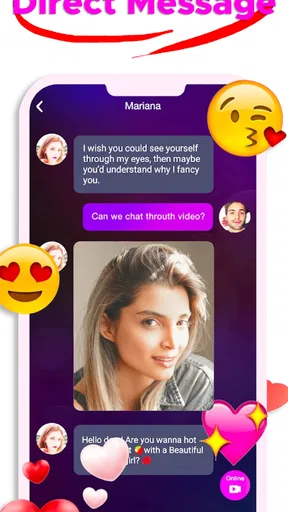
 Analysis by AppCompare
I approached Chatmeet live chat & meet as a social app for people who want to move beyond typed messages and meet others through live video conversation. Its promise is straightforward, but the experience depends on more than the first chat: connection quality, comfort on camera, sensible spending, and the way you handle conversations with strangers all matter. After using it, I see it as a focused option for users who enjoy spontaneous social contact rather than a traditional messaging app built around people they already know.
The app comes from ON TECH and is available free of charge, although optional in-app purchases range from $0.49 to $499.99 per item. That wide range makes it especially important to understand the difference between downloading the app and using it regularly. You can start without paying, but anyone who becomes heavily involved in paid interactions should keep a close eye on the purchase flow and personal budget.
How Chatmeet feels when you use it for live conversations
I found that Chatmeet’s live format changes the pace of meeting people: there is less time to compose a perfect reply and more room to notice whether a conversation feels comfortable in real time. I’d treat that immediacy as a choice, not an obligation—decide what you’re comfortable sharing and how long you want to stay before starting.
Getting started without overcomplicating the experience
The main appeal is easy to understand: meet people, begin a conversation, and use live video when text alone feels too distant. I found that this format creates a quicker sense of whether a conversation feels natural. A short exchange on camera can tell you more about someone’s communication style than a long sequence of carefully written messages, but it also asks more from you immediately. You need to be ready to appear on camera, speak in real time, and decide quickly whether you want to continue.
That immediacy is both the app’s strongest quality and one of its biggest sources of friction. Traditional social networks give me time to browse profiles, read older posts, and respond when convenient. Chatmeet is better suited to a user who wants interaction now. If you prefer to observe quietly before responding, or if you dislike being surprised by a live conversation, the usual text-first alternatives may feel more comfortable.
The app is aimed at mature users, with a 17+ content rating. I would take that seriously rather than treating it as a decorative label. Live social spaces can change tone quickly, and the age rating is a reminder to use personal boundaries, avoid sharing sensitive information, and leave conversations that become uncomfortable. I would not recommend it for younger users or for anyone who is not prepared to manage contact with strangers independently.
Speed expectations depend on the conversation, not just the app
For a live video service, perceived speed is shaped by several links in the chain: the app has to open, the other person has to respond, and the video connection has to remain usable. In my experience, the important question is not simply whether a screen appears quickly. It is whether the transition from browsing to conversation feels smooth enough that the social moment is not lost.
Worth Reading Before You Choose

EA SPORTS FC Mobile 26 Is a Bigger Football Game, but It Takes Time

Flipboard Shows What News Apps Must Do Beyond the Feed

Switching to Android Auto Means Rethinking Your Driving Routine

Google Calendar Makes a Crowded Week Easier to Manage

Ludo King Makes the Most of the Minutes Between Plans

Baby Panda World Brings Quick Play to Modern Phones, but Its Game Library Feels Busy
Chatmeet feels most useful when I treat it as a quick, active session rather than something I leave open all day. I can enter with a clear intention, look for a conversation, and decide whether the exchange deserves more time. That approach also reduces the temptation to keep tapping through possibilities without actually having a meaningful interaction.
There is a practical trade-off here. Live video is more immediate than text, but it is less forgiving when the connection slows or when either person is distracted. A delayed response can feel awkward in a video setting even when the underlying problem is temporary. If your connection is inconsistent, text chat or asynchronous social apps may provide a calmer experience because they do not demand perfect timing.
What happens during heavier use
Longer sessions are naturally more demanding than a few short messages. Video keeps the screen active, requires the phone to process a continuous conversation, and can make a device feel busier than it would during ordinary social browsing. I would avoid judging the app after only a brief launch, because the more relevant test is how comfortable the phone remains after several conversations or repeated switching between people.
My practical advice is to begin with short sessions and notice how your phone behaves. If the device becomes warm, the battery falls faster than expected, or other apps begin to feel sluggish, take a break instead of forcing a long video marathon. This is not a criticism unique to Chatmeet; it is a normal consideration for live video. Still, it affects whether the app fits your routine. It is more convenient for a focused conversation than for constant background use.
Heavy use also has a social cost. The more conversations you start, the easier it becomes to treat people as a rapid sequence of profiles rather than as individuals. I get better results when I slow down, listen properly, and end a conversation politely when there is no connection. That simple habit makes the app feel less tiring and helps avoid spending time or money just because the next interaction is immediately available.
Stability and recovering from interruptions
Reliability in a live chat app is partly about what happens when conditions are imperfect. A call can be interrupted by a weak connection, another notification, a low battery warning, or a user simply changing their mind. I would not expect every session to remain flawless, so the real test is whether I can recover without losing control of the experience.
I recommend treating interruptions as a reason to reset rather than repeatedly tapping in frustration. Close an unresponsive conversation, check the connection, and reopen the app only when the phone is ready. If the problem continues, switching to a more stable network or waiting until you are somewhere with better reception is more sensible than repeatedly attempting paid actions. The key lesson is to avoid assuming that every delay requires another purchase or another attempt.
That recovery mindset is particularly important because live social apps can encourage impulsive decisions. When a conversation ends unexpectedly, it is easy to rush into the next one. I prefer to pause and ask whether the interruption was technical, social, or simply a sign that the exchange had run its course. This small distinction helps protect both time and money.
Device requirements and everyday comfort
The current version is 1.4.63, and the app supports devices running Android 6.0 or later. That broad operating-system range makes it accessible to people who are not using a recent phone, but compatibility alone does not guarantee a comfortable live-video experience. Older or entry-level hardware may handle ordinary messaging well while struggling more with sustained video, multitasking, or heat.
If you are using an older device, I would prepare for a more careful routine. Close demanding apps before starting, keep the phone charged, and use a place with steady connectivity. These steps are not glamorous, but they can make the difference between a relaxed conversation and a session dominated by interruptions. A newer phone with more comfortable battery life is likely to be a better match for frequent use.
Screen size also changes the experience. A compact phone is convenient to carry, but a longer live conversation may feel cramped, especially if you are trying to read messages while staying engaged on camera. A larger display can make the interaction easier to follow, although it does not solve weak connectivity or poor device performance. I see Chatmeet as something to use intentionally on a suitable device, not as an app to run casually on every phone available.
Three habits that make the app more useful
My first useful habit is to set a purpose before opening it. Decide whether you want a brief social conversation, to explore new contacts, or to see whether a particular exchange has potential. Without that limit, the app can turn into an endless loop of checking, waiting, and starting again. A simple time boundary keeps the experience social instead of making it feel like a task.
The second is to separate curiosity from commitment. A lively first impression does not automatically mean that someone is trustworthy or that a conversation deserves personal details. I keep identifying information, financial information, and private routines out of early chats. Video can create a false sense of familiarity because you see a person directly, but visual contact is not the same as knowing them.
The third is to review purchases before confirming them. Since the optional items span from $0.49 to $499.99, I would never tap through quickly during an exciting conversation. Check the amount, consider whether the action is necessary, and set a personal spending limit before using paid elements. This is one of the most important practical differences between trying the app for free and making it part of a regular social routine.
Who will enjoy it, and who should choose something else?
I think Chatmeet is a good fit for adults who enjoy meeting unfamiliar people, are comfortable with live video, and value immediate interaction over carefully edited profiles. It can also suit someone who has become tired of social apps where conversations remain stuck in short text replies. The live format gives an exchange more energy and makes it easier to decide whether there is genuine conversational chemistry.
I would point a different user toward a conventional messaging network if they mainly want to keep up with friends, organize group discussions, or maintain conversations at their own pace. Likewise, people looking for a structured dating service with detailed matching tools may prefer an app designed around profiles and search filters rather than spontaneous live contact. Chatmeet’s strength is immediacy, not necessarily deep organization.
It is also not the right choice for someone who feels pressured by live interaction or who has difficulty saying no to paid prompts. The free entry point is useful for trying the style, but the available purchases mean self-control matters. If you want a completely cost-free social experience with no temptation to spend, a basic text-based platform may be a better match.
How it compares with ordinary social alternatives
Compared with standard messaging apps, Chatmeet puts the human presence first. There is less room to polish every sentence, and that can make conversations feel more genuine. On the other hand, text alternatives are usually better when I need privacy, accessibility, quiet communication, or the ability to respond later. Neither format is universally superior; they serve different moods and situations.
Compared with large social networks, Chatmeet feels narrower and more intentional. A general network may offer news, communities, photos, and familiar contacts alongside messaging. Here, the central reason to open the app is meeting and talking. That focus can be refreshing, but it also means there is less to do if I am not in the mood for direct conversation.
Compared with dating apps that rely on swiping and profile research, the live approach can reveal conversational compatibility sooner. The trade-off is that it gives me less time to assess context before interacting. I would use Chatmeet when I want an immediate social test, while choosing a profile-driven service when compatibility details, slower pacing, or more deliberate filtering matter more.
What the app’s popularity suggests—and what it does not guarantee
The app has passed one million installs and holds a 4.5 average from around 44 thousand ratings. Those figures suggest that the live-meeting concept has found a substantial audience, and they make the app worth considering rather than dismissing as an obscure experiment. They do not guarantee that every conversation will suit me, because social compatibility is personal and depends heavily on timing and the people available when I open it.
It has also accumulated around 929 written reviews, which gives prospective users more public feedback to examine before deciding. I would still read comments with some caution: people often judge social apps based on a small number of conversations, and one person’s ideal interaction can be another person’s uncomfortable experience. The rating is a useful signal, not a substitute for setting boundaries and testing the app carefully.
My performance verdict after weighing the trade-offs
Chatmeet works best when I use it as a focused live-social tool on a reasonably prepared device. Its immediate video format can make meeting someone feel more personal than exchanging endless text, and the free download lowers the barrier to trying that style. The experience is most convincing when the connection is steady, the phone is not overloaded, and I enter with realistic expectations rather than expecting every chat to become meaningful.
Its limitations are equally clear. Live video is more sensitive to interruptions than ordinary messaging, longer sessions can be harder on a phone, and the broad range of optional purchase prices demands attention. The mature audience rating also means I would approach conversations with adult judgment, patience, and firm privacy boundaries. These are not reasons to avoid the app automatically, but they are reasons to use it deliberately.
Overall, I would recommend Chatmeet to an adult friend who specifically wants spontaneous video conversations and understands the difference between trying a free social app and spending inside it. I would not recommend it to someone seeking a quiet, private, text-first experience or a highly structured matching system. For the right user, its focused format is the point; for everyone else, a familiar messaging or profile-based alternative may be more comfortable and easier to control.
My final advice is simple: start slowly, protect your privacy, watch your phone’s comfort during longer sessions, and treat every purchase as optional rather than necessary. Used that way, Chatmeet can be an engaging way to meet people live without letting speed, interruptions, or the pressure of the moment decide how you use it.
Pros
- Easy way to discover and chat with people worldwide.
- Live video interactions make conversations feel more personal.
- Simple interface is suitable for casual social use.
- Useful filters can help narrow down potential matches.
- Available on mobile for chatting wherever you go.
Cons
- Some features may require in-app purchases or a subscription.
- Interactions can vary widely depending on who is online.
- Users may encounter unwanted messages or inappropriate behavior.
- A stable internet connection is needed for smooth video chats.
- Sharing personal details with strangers can create privacy risks.
FAQs for Chatmeet live chat & meet
What is Chatmeet Live Chat & Meet, and how does it work?
Chatmeet Live Chat & Meet is a social communication app designed for meeting and chatting with new people online. After creating a profile, users can browse available members, start conversations, and in some cases use live or video-chat features. The experience depends on the people currently online, your location, and the permissions you grant to the app.
Is Chatmeet Live Chat & Meet free to download and use?
The app can generally be downloaded at no initial cost, but some features may require in-app purchases, credits, subscriptions, or other paid options. Basic browsing and messaging availability can vary by account and region. Before spending money, check the current pricing shown inside the app and review whether recurring subscriptions are enabled.
Does Chatmeet require access to my camera, microphone, or location?
Depending on which functions you use, Chatmeet may request access to your camera and microphone for video or voice communication. It may also use location-related information to help suggest nearby or relevant users. You can deny optional permissions, although doing so may limit certain features. Review the permission requests carefully and allow only what you need.
Is Chatmeet Live Chat & Meet safe for meeting strangers online?
As with any social or dating-style platform, users should remain cautious when communicating with people they do not know. Avoid sharing your home address, financial information, passwords, or private documents. Use the app’s blocking and reporting tools when necessary, and be careful with suspicious links or requests for money. If arranging an in-person meeting, choose a public place and tell someone you trust.
Can I delete my Chatmeet account and control my privacy?
Chatmeet users should be able to manage parts of their profile, permissions, notifications, and communication settings through the app or device settings. Account deletion options may be located in the profile, settings, or help section, and the exact process can change between versions. Before deleting your account, check whether messages, profile information, subscriptions, or purchased credits are removed or require separate cancellation.


